Vehicle tracking and fleet management
Your fleet, on the right route.
From staff shuttles to delivery vans, airport transfers to field-service crews: watch every vehicle live and send your customer a single link that shows where it is. You set the rules; Rotapia keeps watch.
| Vehicle | Job | Status |
|---|---|---|
| TR06 KRG 233 | DeliveryOstim → Çankaya | 7 min |
| TR41 SRV 118 | Staff shuttleGebze industrial zone | Arrived |
| TR34 VIP 088 | TransferIstanbul Airport | 16 min |
| TR35 TKN 410 | Field serviceBornova, repair call | Idling |
| TR16 INS 027 | Construction siteNilüfer | Parked |
One day, four fleets
One dashboard, different jobs
Pick your industry and follow an ordinary day of that fleet, hour by hour, to see what Rotapia takes off your plate.
The shuttle sets off
Route recording starts on its own. Operations sees every shuttle on one map.
Staff watch from the stop
Drop a three-hour location link into the staff WhatsApp group. Without installing anything, people see where the shuttle is and stop waiting in the cold.
Entering the factory zone
The moment it enters the zone you drew on the map is recorded. Which shuttle arrived when is in the report.
Out-of-hours use
If a shuttle moves at night, you get an alert. Vehicles don't get used without your knowledge.
Period report
Distance, driving and idle time, and speeding per vehicle. Export to Excel in one click.
The van leaves the depot
A depot-exit alert arrives; the day's first movement is on record.
Long idling
Engine on, vehicle standing for 15 minutes. You know before the fuel is wasted.
A customer is waiting
Answer “where's my courier?” with a link. The customer sees the van on the map and stops calling.
Speeding
You set the limit: alert if 90 km/h is exceeded for 30 seconds. It warns once, it doesn't nag.
Daily report
Every vehicle's trips, stops, distance and first and last movement in one table.
The passenger gets a link
Tap the vehicle and choose Share. The meeting point is the airport; the passenger sees how far away the vehicle is.
Entering the airport zone
A zone alert fires. If your agency partner is integrated, the location and trip status reach them automatically.
Passenger on board
The link closes itself when it expires; the vehicle's location doesn't stay open on the passenger's phone.
Waiting time on record
The zone visit report shows how many minutes the vehicle waited at the airport.
Crews head out
Which technician is where, and who is closest to the customer: one glance at the map.
“Your technician is on the way”
Send the customer a location link and the “what time are you coming?” calls stop.
Connection lost
If a vehicle sends no data for the time you set, you get an alert.
Customer visits
Draw customer sites as zones; the report shows which vehicle spent how long at each.
Dashboard
On the desktop at the office, on your phone on the road
No app store download. Open it in the browser and add it to your home screen; it works like an app, notifications included.
- Live map
- Moving, idling, parked, no signal. Vehicle icons point the way they're heading; the map rotates.
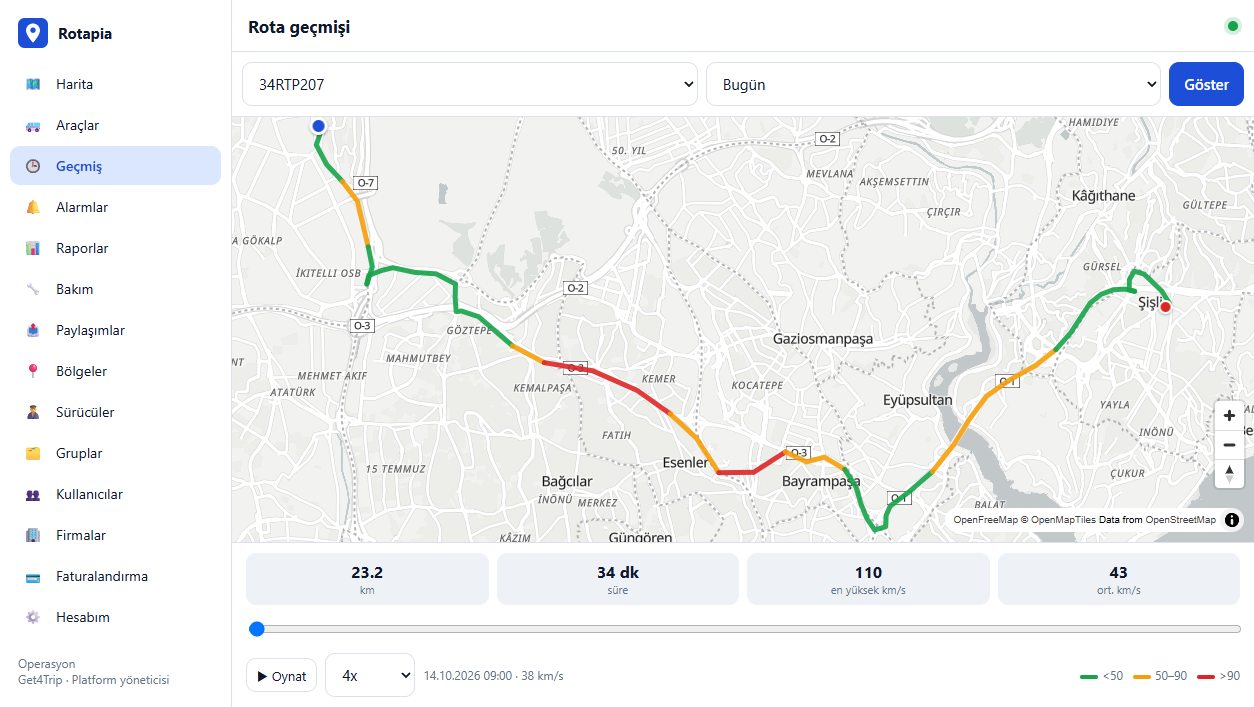
- Route history
- Routes coloured by speed, playback from 1× to 16×. <50 50–90 >90 km/h
- Alerts
- Zone entry and exit, speeding, out-of-hours use, long idling, lost connection.
- Reports
- Trips, daily, period, zone visits. Excel or print.
- Team
- Driver assignment, vehicle groups; admin, operations and viewer roles.
- Integration
- Send location data to your own software or partners via API and webhooks.
- Data protection
- Every look at location data is logged: who and when. Data exports and justified deletion from the dashboard, built for Turkey's KVKK.
Pricing
Per vehicle, per month
No quote forms and waiting; the model is clear from day one.
- What you pay
- One monthly fee for each vehicle that runs at least one day in the month. Swap the device and the vehicle still counts once.
- Trial
- Vehicles aren't billed during the trial period.
- As you grow
- The unit price drops as your fleet grows.
- Clear invoices
- This month's estimate and past invoices are in your dashboard.
See it with your own vehicles
Leave your name and number and we'll call you. We'll plan the right device and setup for your fleet together.
Four fields, one checkbox. No city list.